
Claude Code training for teams
Hands-on sessions on your own repositories, from first use to everyday team practice. Remote or on-site.
You keep Reusable prompts, a review checklist and a plan for the next task.
What the training coversClaude Code · Anthropic Partner
Secure Engineering for Humans and AI. Train your engineers, set the boundaries and connect Claude Code to GitLab.

Why it needs setting up
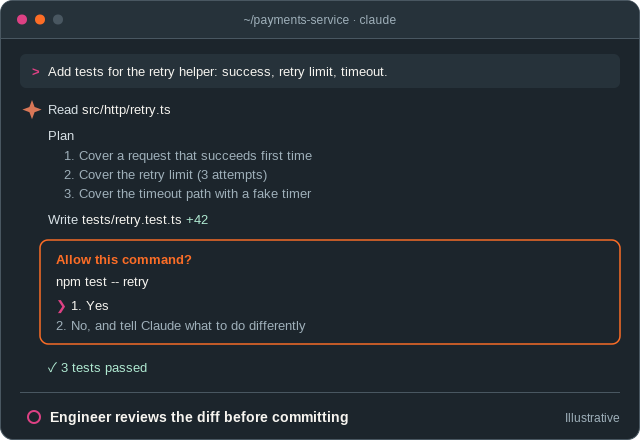
It reads your repositories, edits files and runs commands. That is where the value comes from, and why your security team will ask how it's controlled. Both come down to the same two questions: what is it allowed to do, and who checks the result?
Sounds familiar?
In practice
What we do
Take one, or combine them.
Hands-on sessions on your own repositories, from first use to everyday team practice. Remote or on-site.
You keep Reusable prompts, a review checklist and a plan for the next task.
What the training coversChoose the access route: a Claude plan, the Claude API, Amazon Bedrock or Google Vertex AI. Then agree permission rules, shared settings, approved tool connections and what Claude Code may see.
You keep A setup record your security team has reviewed.
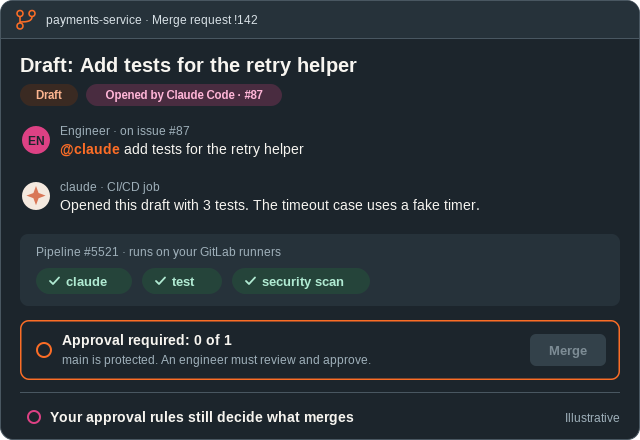
The OTTRA MethodRun Claude Code in GitLab CI/CD, so engineers can ask it to work on an issue or merge request. Its changes come back as merge requests under your protected branches and approval rules. Using GitLab Duo too? We agree which tool does what.
You keep A working pipeline job and the rules around it.
GitLab servicesCloud Choice™, our managed service for GitLab and Claude, can run Claude access for your engineers alongside GitLab, in the cloud account and location you choose.
You keep Agreed operating responsibilities for each deployment.
Explore Cloud Choice™What the training covers
Taught on your code, with the settings your organisation has agreed. Engineers can take Anthropic's free Claude Code courses alongside it.
How it reads a codebase, and how to ask questions it can answer well.
Project memory in CLAUDE.md: what to include and what to leave out.
Plan mode, and breaking work into steps you can check.
Permission modes, allow and deny rules, and what always needs approval.
Reading diffs, running checks, and knowing when to stop and start again.
Shared settings, hooks, custom commands and approved MCP servers.
Pipeline jobs, @claude requests and merge request review.
Review effort, rework and what to try next.
How an engagement runs
The task, the code Claude Code may use, the access route and a named reviewer.
Settings, permissions and, if you want it, the GitLab pipeline job. Tested before the first session.
Engineers work through the real task with us alongside, reviewing every change.
The setup record, reusable guidance and owners for the next task.
We agree scope, timing and cost before work starts. Already using Claude Code without agreed settings? A Health Check reviews your GitLab platform, delivery workflow and AI use together.
Why OTTRA
Anthropic Partner · GitLab Select Partner · GitLab Professional Services Partner · UKAI member
Most Claude Code courses teach the tool on its own. Your engineers use it inside a delivery system: repositories, pipelines, protected branches, approval rules and security scanning. We work on both halves of that system, so what Claude Code produces passes the same tests and reviews as any other change, and engineers stay accountable for what ships.
Common questions
Claude Code is Anthropic's agentic coding tool. It reads your codebase, edits files and runs commands, in the terminal, in your editor and in CI/CD. Because it can act as well as suggest, the permissions you give it and the reviews its changes pass through matter as much as the model. Anthropic's Claude Code documentation.
Yes. We train engineering teams across the UK and Europe, remotely or on-site, using your own repositories and the settings your organisation has agreed. Sessions cover context, planning, permissions, reviewing diffs and working with GitLab, and end with guidance your team can reuse on the next task.
Anthropic publishes free Claude Code courses with completion certificates, and runs separate Claude certification exams that cover more than Claude Code. Certificates show that someone has studied the tool. Our training is about using it well on your code, and engineers can take Anthropic's courses alongside it.
Yes. Engineers can use Claude Code on any GitLab repository from their own machine. Claude Code for GitLab CI/CD, currently in beta and maintained by GitLab, also runs it inside a pipeline job, where it can respond to requests in issues and merge requests and propose changes as merge requests. Anthropic's GitLab CI/CD guide.
Yes, within the options Anthropic and the cloud providers offer. Claude Code can run through Anthropic directly, or through Amazon Bedrock or Google Vertex AI in your own cloud account. We agree the access route, the regions available to you and what Claude Code may read with your security team, and record the decision.
They do different jobs. GitLab Duo is built into GitLab across planning, code review, security and pipelines. Claude Code is an agent that works in an engineer's environment and in CI/CD. Many teams use both. We help you decide which tool handles which task, based on your licences and your work. GitLab Duo enablement.
Either a Claude plan that includes Claude Code, or usage-based access through the Claude API, Amazon Bedrock or Google Vertex AI. The right choice depends on team size, how you want to control costs and where your data has to stay. Tell us your situation and we will talk through the options. Ask about Claude Code.
Your first conversation
Bring one task your engineers want to improve, how your team accesses Claude today, and any rules about code or data.
Your task. Agreed boundaries. Your engineer's decision.
Scroll to see allUse the left and right arrow keys to scroll.
 Platform partner
 Services partner
 AI partner
 Certification
 Certification
 Member